---
title: Bayt Remote CV Search, Troubleshooting Guide
description: Bayt Remote CV Search, Troubleshooting Guide
---
[Skip to content](https://lp.talentera.com/en/help/bayt-remote-cv-search-troubleshooting-guide#main-content)
English
Show submenu for translations

Open main navigation
Close main navigation
- English
Show submenu for translations
How can we help you?
- There are no suggestions because the search field is empty.
1. [Talentera Help Center](https://lp.talentera.com/en/help?hsLang=en)
2. [Employers](https://lp.talentera.com/en/help/employers?hsLang=en)
3. [Bayt Remote CV Search](https://lp.talentera.com/en/help/employers?hsLang=en#bayt-remote-cv-search)
# Bayt Remote CV Search, Troubleshooting Guide
### **Overview**
This article covers the most common issues when using Bayt Remote CV Search and how to resolve them. If the issue persists after following these steps, contact support with your account details and a description of the problem.
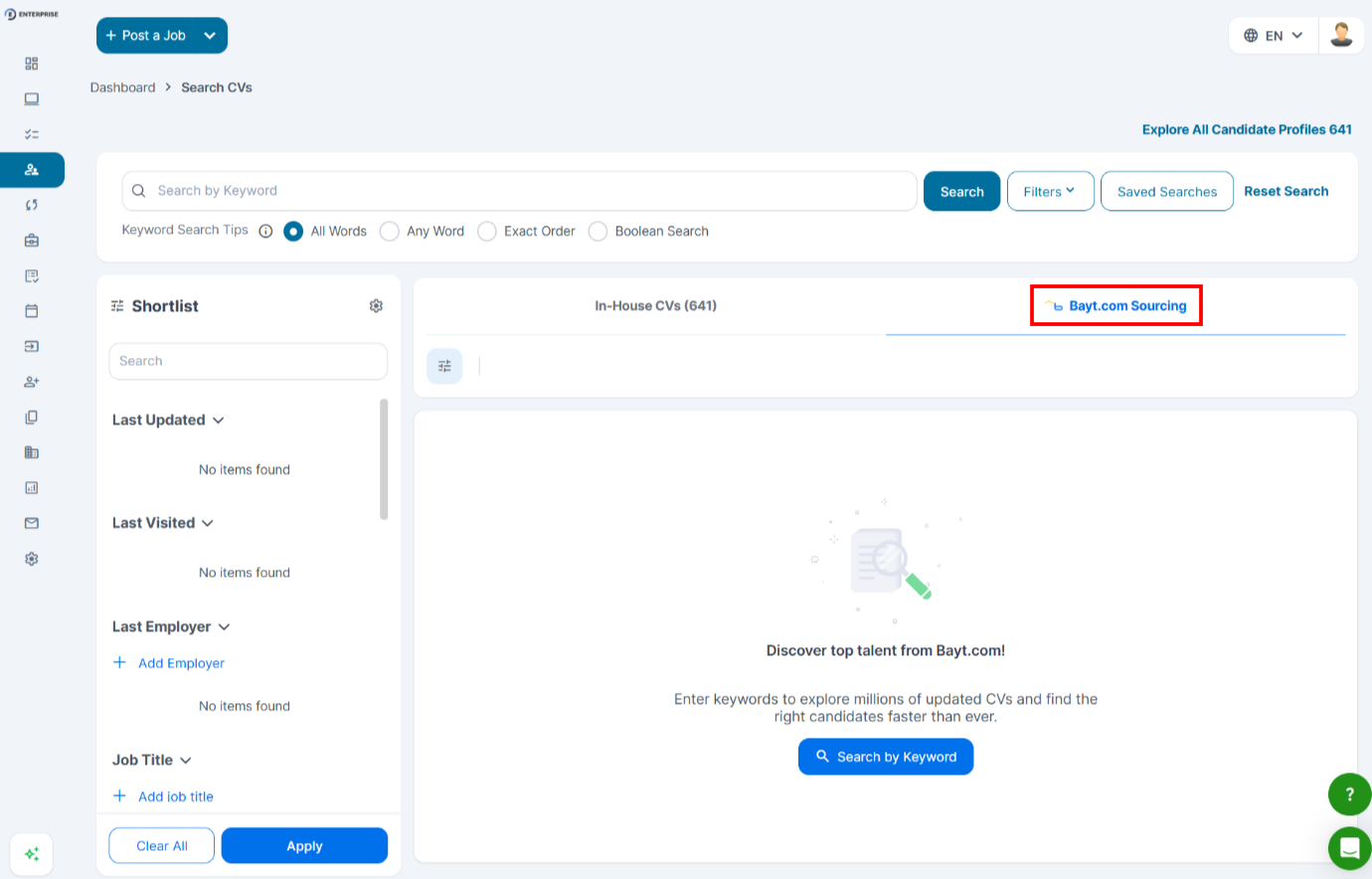
### **The Bayt CV Search Tab Is Not Visible**
- To access features, your account must have Bayt Remote CV Search enabled. Contact your admin.
- Role permissions: your role may not have search permissions. Ask your admin to check your Bayt CV Search role settings in the Admin Panel.
- Browser, try clearing your browser cache and refreshing the page.
|  |
| --- |
### **Search Returns No Results**
If your search returns zero candidates:
- Broaden your search terms, try a less specific job title.
- Remove one or more filters and search again.
- Check for typos in the search bar.
- If using Arabic search terms, try the English equivalent or vice versa.
| **💡 Tip:** Start with a broad search and narrow down using filters. Very specific searches may return limited results. |
| --- |
### **Search Results Are Not Relevant**
If the returned candidates do not match the role:
- Use a more specific job title.
- Add location and experience level filters to narrow results.
- Add skills filters to surface candidates with the right expertise.
### **Saved Candidates Are Not Appearing in My Pool**
- Refresh the Bayt CV Search tab.
- Confirm you clicked Save or Add to Pool, and that you saw a confirmation.
- Check whether a team member with different permissions is viewing a different view.
- If saved candidates are still missing after refreshing, contact support.
### **Credits Are Not Updating After an Action**
If your credit balance does not appear to change after an action:
- Refresh the Admin Panel page.
- Credit deductions may take a moment to reflect.
- If the balance is still incorrect after refreshing, contact support with a list of actions taken and their timestamps.
### **Invite to Apply Email Not Received by Candidate**
- Confirm that the Invite to Apply action was completed and look for the confirmation email.
- Ask the candidate to check their spam or junk folder.
- If the issue persists, contact support with the job ID and candidate email.
### **Cannot Add a Candidate to a Job Pipeline**
- Confirm the target job is in a Live or Published state.
- Check your role permissions; you may not have the ‘Take actions’ permission for Bayt CV Search.
- Check your credit balance; some actions may require available credits.
**Frequently Asked Questions**
**Why can I see some candidates but not take action on them?**
Your role may have search and view permissions but not action permissions. Ask your admin to review your Bayt CV Search role settings.
**The candidate’s CV preview is blank or incomplete. What should I do?**
Try refreshing the page. If the preview is still incomplete, contact support with the candidate's details.
**Can I export my saved candidate pool?**
Export capabilities depend on your account configuration. Check with your admin for available export options.
- [Employers](https://lp.talentera.com/en/help/employers?hsLang=en#main-content)
- [Dashboard](https://lp.talentera.com/en/help/employers?hsLang=en#dashboard)
- [My Workspace](https://lp.talentera.com/en/help/employers?hsLang=en#my-workspace)
- [Candidates](https://lp.talentera.com/en/help/employers?hsLang=en#candidates)
- [Jobs](https://lp.talentera.com/en/help/employers?hsLang=en#jobs)
- [Evaluation Forms](https://lp.talentera.com/en/help/employers?hsLang=en#evaluation-forms)
- [Reports](https://lp.talentera.com/en/help/employers?hsLang=en#reports)
- [Requisitions](https://lp.talentera.com/en/help/employers?hsLang=en#requisitions)
- [Hiring Approval](https://lp.talentera.com/en/help/employers?hsLang=en#hiring-approval)
- [Admin Panel](https://lp.talentera.com/en/help/employers?hsLang=en#admin-panel)
- [Document Requests](https://lp.talentera.com/en/help/employers?hsLang=en#document-requests)
- [Letters](https://lp.talentera.com/en/help/employers?hsLang=en#letters)
- [Question Library](https://lp.talentera.com/en/help/employers?hsLang=en#question-library)
- [Questionnaires](https://lp.talentera.com/en/help/employers?hsLang=en#questionnaires)
- [Offer Letters](https://lp.talentera.com/en/help/employers?hsLang=en#offer-letters)
- [Sanad AI Assistant](https://lp.talentera.com/en/help/employers?hsLang=en#sanad-ai-assistant)
- [Bayt Remote CV Search](https://lp.talentera.com/en/help/employers?hsLang=en#bayt-remote-cv-search)
- [Job Seekers](https://lp.talentera.com/en/help/job-seekers?hsLang=en#main-content)
- [Creating an Account](https://lp.talentera.com/en/help/job-seekers?hsLang=en#creating-an-account)
- [Login](https://lp.talentera.com/en/help/job-seekers?hsLang=en#login)
- [Adding a Cover Letter](https://lp.talentera.com/en/help/job-seekers?hsLang=en#adding-a-cover-letter)
- [Building the CV](https://lp.talentera.com/en/help/job-seekers?hsLang=en#building-the-cv)
- [Searching for Jobs](https://lp.talentera.com/en/help/job-seekers?hsLang=en#searching-for-jobs)
- [Dashboard](https://lp.talentera.com/en/help/job-seekers?hsLang=en#dashboard)
[%20(7).png?width=55&height=55&name=Linkedin%20Ads%20-%20(1200%20%C3%97%201200%20px)%20(7).png "Linkedin Ads - (1200 × 1200 px) (7)")](http://www.talentera.com)
Copyright © 2026, Bayt Group
[mailto:CSM@bayt.net](mailto:CSM@bayt.net)