---
title: How to Use Bayt Remote CV Search?
description: How to Use Bayt Remote CV Search?
---
[Skip to content](https://lp.talentera.com/en/help/how-to-use-bayt-remote-cv-search#main-content)
English
Show submenu for translations

Open main navigation
Close main navigation
- English
Show submenu for translations
How can we help you?
- There are no suggestions because the search field is empty.
1. [Talentera Help Center](https://lp.talentera.com/en/help?hsLang=en)
2. [Employers](https://lp.talentera.com/en/help/employers?hsLang=en)
3. [Bayt Remote CV Search](https://lp.talentera.com/en/help/employers?hsLang=en#bayt-remote-cv-search)
# How to Use Bayt Remote CV Search?
### **Overview**
This article explains how to run a search, apply filters, and save a reusable candidate set inside Talentera. A complete run of this workflow takes under 3 minutes.
### **Step 1: Open Bayt Remote CV Search**
1. Log in to Talentera.
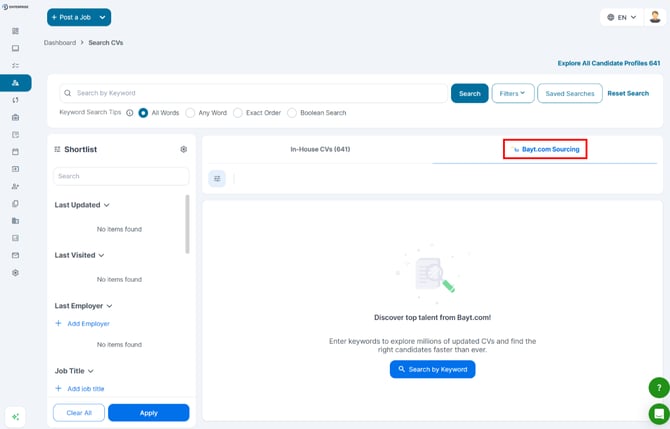
2. Navigate to the CV search.
3. Start searching for a position within your in-house candidate pool or the Bayt CV Search tab inside Talentera.
|  |
| --- |
| **📌 Note:** If you do not see the Bayt CV Search tab, your account may not have the feature enabled or your role may not have search permissions. |
| **💡 Tip:** Start broad and then filter down. The value is in narrowing to a small, high-quality set. |
| --- |
### **Step 3: Apply Filters**
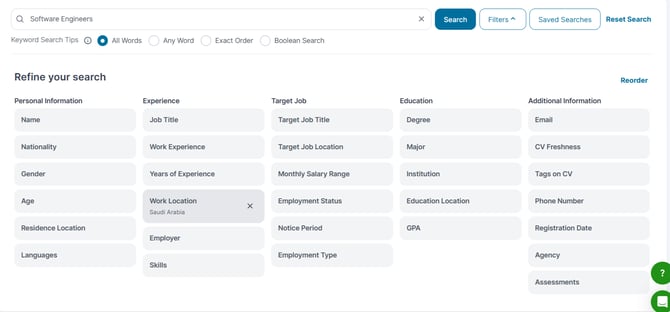
Apply at least two filters; Location and Experience Level are the minimum recommended baseline.
- Location, country, or city.
- Experience Level: entry, mid-level, senior, manager.
- Skills, filter by skills listed on candidate profiles.
- Education Level, degree type, or field of study.
- Nationality, where relevant to the role.
|  |
| --- |
| |
### **Step 4: Review Candidate Profiles**
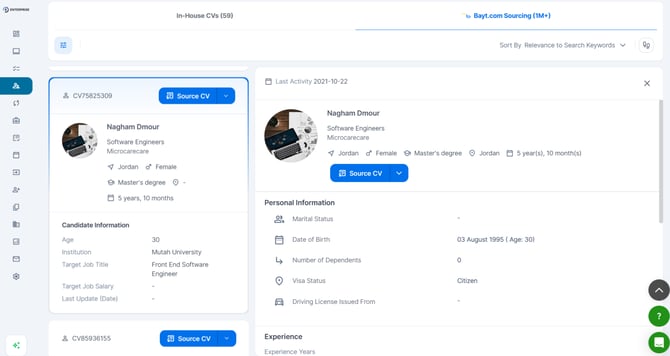
Click any candidate card to open their CV preview. Review profiles to identify the strongest candidates before saving.
|  |
| --- |
**Frequently Asked Questions**
**How many candidates should I save?**
Aim for 5+ as a starting point. A pool of 8–15 strong candidates is more useful than a pool of 50 broadly relevant ones.
**Can I search in Arabic?**
Yes. Enter search terms in Arabic or English.
**Will I be charged credits for every search?**
Credits are consumed by specific actions, not by running searches or viewing cards.
- [Employers](https://lp.talentera.com/en/help/employers?hsLang=en#main-content)
- [Dashboard](https://lp.talentera.com/en/help/employers?hsLang=en#dashboard)
- [My Workspace](https://lp.talentera.com/en/help/employers?hsLang=en#my-workspace)
- [Candidates](https://lp.talentera.com/en/help/employers?hsLang=en#candidates)
- [Jobs](https://lp.talentera.com/en/help/employers?hsLang=en#jobs)
- [Evaluation Forms](https://lp.talentera.com/en/help/employers?hsLang=en#evaluation-forms)
- [Reports](https://lp.talentera.com/en/help/employers?hsLang=en#reports)
- [Requisitions](https://lp.talentera.com/en/help/employers?hsLang=en#requisitions)
- [Hiring Approval](https://lp.talentera.com/en/help/employers?hsLang=en#hiring-approval)
- [Admin Panel](https://lp.talentera.com/en/help/employers?hsLang=en#admin-panel)
- [Document Requests](https://lp.talentera.com/en/help/employers?hsLang=en#document-requests)
- [Letters](https://lp.talentera.com/en/help/employers?hsLang=en#letters)
- [Question Library](https://lp.talentera.com/en/help/employers?hsLang=en#question-library)
- [Questionnaires](https://lp.talentera.com/en/help/employers?hsLang=en#questionnaires)
- [Offer Letters](https://lp.talentera.com/en/help/employers?hsLang=en#offer-letters)
- [Sanad AI Assistant](https://lp.talentera.com/en/help/employers?hsLang=en#sanad-ai-assistant)
- [Bayt Remote CV Search](https://lp.talentera.com/en/help/employers?hsLang=en#bayt-remote-cv-search)
- [Job Seekers](https://lp.talentera.com/en/help/job-seekers?hsLang=en#main-content)
- [Creating an Account](https://lp.talentera.com/en/help/job-seekers?hsLang=en#creating-an-account)
- [Login](https://lp.talentera.com/en/help/job-seekers?hsLang=en#login)
- [Adding a Cover Letter](https://lp.talentera.com/en/help/job-seekers?hsLang=en#adding-a-cover-letter)
- [Building the CV](https://lp.talentera.com/en/help/job-seekers?hsLang=en#building-the-cv)
- [Searching for Jobs](https://lp.talentera.com/en/help/job-seekers?hsLang=en#searching-for-jobs)
- [Dashboard](https://lp.talentera.com/en/help/job-seekers?hsLang=en#dashboard)
[%20(7).png?width=55&height=55&name=Linkedin%20Ads%20-%20(1200%20%C3%97%201200%20px)%20(7).png "Linkedin Ads - (1200 × 1200 px) (7)")](http://www.talentera.com)
Copyright © 2026, Bayt Group
[mailto:CSM@bayt.net](mailto:CSM@bayt.net)