
Overview
This article covers the most common issues when using SANAD AI Summary and how to resolve them. If the issue persists after following these steps, contact support with the candidate ID and a description of the problem.
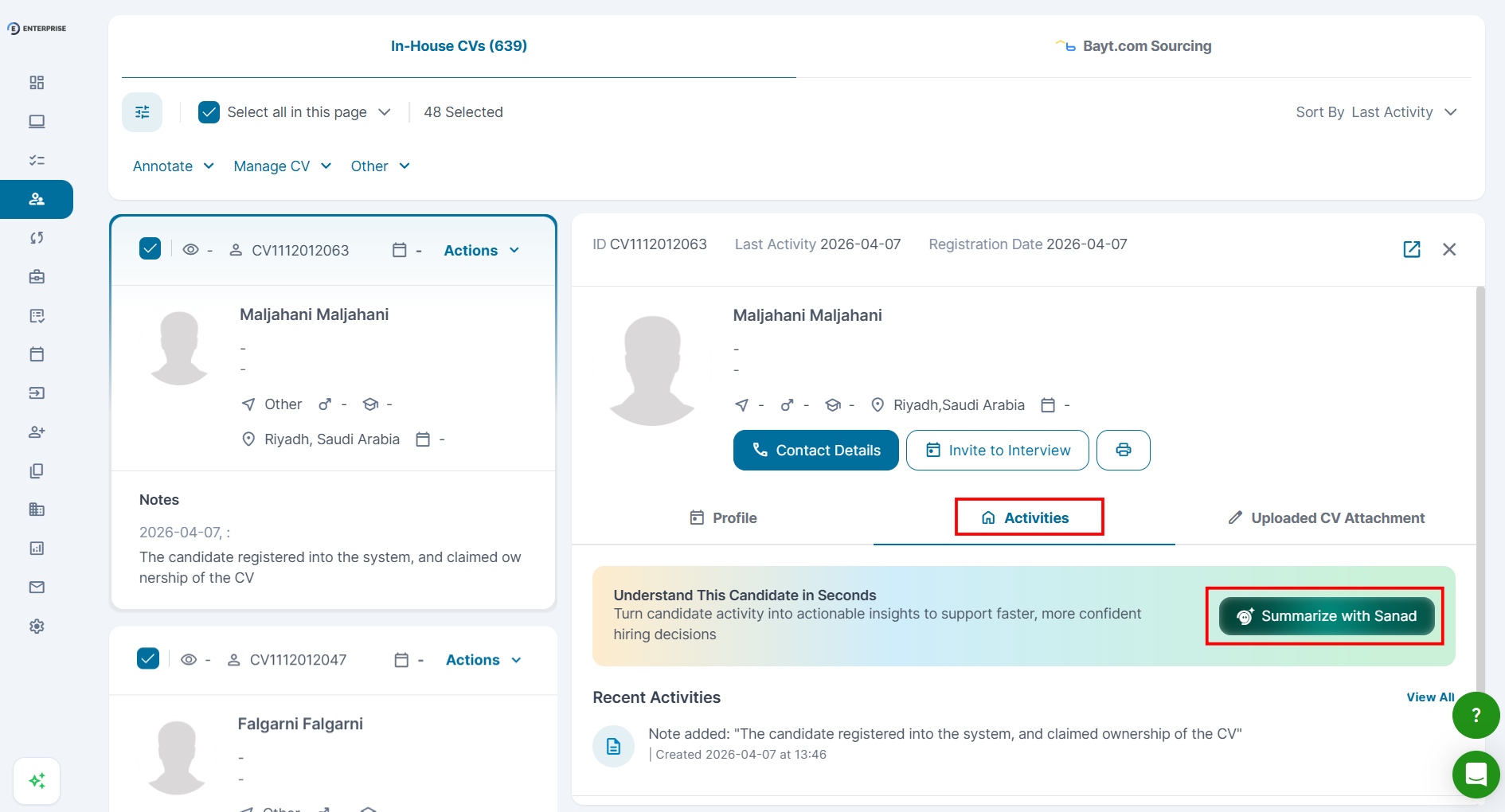
The 'Summarize with Sanad' Button Is Not Visible
- SANAD AI access: your account must have SANAD AI features enabled. Contact your admin to confirm.
- Location: the button appears only on the Activities tab within a candidate profile in CV Search. It is not available in the Job Inbox in Phase 1.
- Browser, try clearing your browser cache and refreshing the page.
The Summary Takes Too Long to Generate
Summaries typically generate within a few seconds. If the loading indicator persists beyond 30 seconds:
- Refresh the page and try again.
- Check your internet connection.
- If the issue continues, contact support with the candidate ID.
The Summary Is Empty or Very Short
A short or empty summary is not a system error. It means the candidate has limited recorded activity in your account. Common reasons:
- The candidate applied to only one role.
- No evaluations have been completed for this candidate.
- The candidate was recently imported and has no pipeline history yet.
|
📌 Note: In these cases, rely on the candidate’s CV and direct evaluation rather than the summary. |
The Summary Appears Incorrect or Outdated
- Check the candidate’s full activity log to verify the underlying data.
- If the activity was recently added, click Summarize with Sanad again to regenerate.
- If the summary still does not match the activity log, contact support with the candidate ID and a screenshot.
|
⚠️ Warning: Each regeneration consumes one AI credit. |
The Summary Language Does Not Match My Interface Language
The summary is generated in your current Talentera interface. If it appears in the wrong language:
- Check your interface language setting in your Talentera profile.
- Regenerate the summary after switching languages if needed.
AI Credits Are Being Consumed, But No Summary Appears
If a credit was deducted but no summary is visible, refresh the page. If the summary still does not appear, contact support with the candidate ID, the time of the action, and a screenshot of your credit balance.
Frequently Asked Questions
Why can’t I see the candidate summary in the Job Inbox?
In Phase 1, the SANAD AI Summary is available only in CV Search. Job Inbox support is planned for a future release.
I generated a summary, but my colleague cannot see it. Why?
Summaries are visible to all users with access to the candidate profile. Ask your colleague to refresh the page. If it's still not visible, their role permissions may differ; contact your admin.
How do I report a bug with the summary content?
Contact support with: the candidate ID, a screenshot of the summary, and a description of what appears incorrect.