---
title: Understanding Your SANAD AI Summary?
description: Understanding Your SANAD AI Summary?
---
[Skip to content](https://lp.talentera.com/en/help/understanding-your-sanad-ai-summary#main-content)
English
Show submenu for translations

Open main navigation
Close main navigation
- English
Show submenu for translations
How can we help you?
- There are no suggestions because the search field is empty.
1. [Talentera Help Center](https://lp.talentera.com/en/help?hsLang=en)
2. [Employers](https://lp.talentera.com/en/help/employers?hsLang=en)
3. [Sanad AI Assistant](https://lp.talentera.com/en/help/employers?hsLang=en#sanad-ai-assistant)
# Understanding Your SANAD AI Summary?
### **Overview**
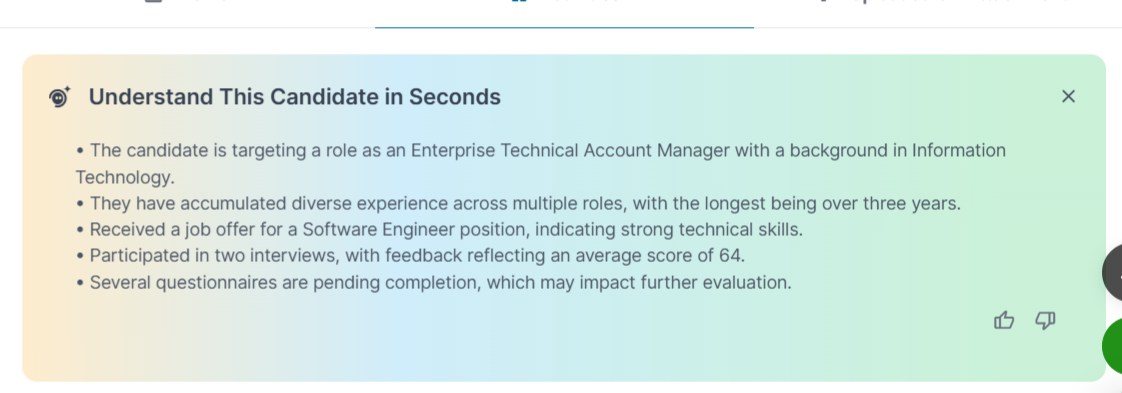
This article explains how to interpret each section of a SANAD AI Summary, what to do when a summary is brief or incomplete, and when to go beyond the summary to the full candidate profile.
### **Application Patterns**
Shows which roles the candidate has applied to within your account, how often, and across what time period. Use this to gauge the candidate's level of engagement with your organization.
### **Missed Steps**
Lists scheduled steps the candidate did not complete, such as an interview invitation not responded to, a questionnaire not submitted, or an assessment link that expired.
### **Evaluation Scores**
The aggregate evaluation form scores are assigned by your team across all roles in your account. Scores are shown as recorded; they are not re-weighted or normalized by SANAD.
### **Pipeline Outcomes**
Shows the stages where the candidate advanced, was screened out, or rejected, and at which stage each outcome occurred.
### **When the Summary Is Brief or Empty**
If a candidate has limited activity in your account, the summary will be short. This is not an error. In these cases, rely on the candidate’s CV and your direct evaluation.
| **📌 Note:** A brief summary is not a negative signal. It simply means less activity data was available. |
| --- |
### **Using the Summary Alongside the Full Profile**
SANAD AI Summary is a starting-point tool, not a replacement for a full profile review. Use it to:
- Quickly identify candidates worth a deeper review.
- Surface candidates with strong evaluation scores from previous roles.
- Identify candidates with a strong application and engagement history.
**Frequently Asked Questions**
**Can I edit a summary?**
No. Summaries are generated automatically and cannot be edited. Update the underlying records and regenerate.
**Are summaries stored permanently?**
Yes. Once generated, a summary is stored and visible until refreshed by new activity or manually regenerated.
**Does SANAD AI Summary work for externally imported candidates?**
The summary reflects activity recorded inside Talentera. The Talentera activity for imported candidates will appear.
- [Employers](https://lp.talentera.com/en/help/employers?hsLang=en#main-content)
- [Dashboard](https://lp.talentera.com/en/help/employers?hsLang=en#dashboard)
- [My Workspace](https://lp.talentera.com/en/help/employers?hsLang=en#my-workspace)
- [Candidates](https://lp.talentera.com/en/help/employers?hsLang=en#candidates)
- [Jobs](https://lp.talentera.com/en/help/employers?hsLang=en#jobs)
- [Evaluation Forms](https://lp.talentera.com/en/help/employers?hsLang=en#evaluation-forms)
- [Reports](https://lp.talentera.com/en/help/employers?hsLang=en#reports)
- [Requisitions](https://lp.talentera.com/en/help/employers?hsLang=en#requisitions)
- [Hiring Approval](https://lp.talentera.com/en/help/employers?hsLang=en#hiring-approval)
- [Admin Panel](https://lp.talentera.com/en/help/employers?hsLang=en#admin-panel)
- [Document Requests](https://lp.talentera.com/en/help/employers?hsLang=en#document-requests)
- [Letters](https://lp.talentera.com/en/help/employers?hsLang=en#letters)
- [Question Library](https://lp.talentera.com/en/help/employers?hsLang=en#question-library)
- [Questionnaires](https://lp.talentera.com/en/help/employers?hsLang=en#questionnaires)
- [Offer Letters](https://lp.talentera.com/en/help/employers?hsLang=en#offer-letters)
- [Sanad AI Assistant](https://lp.talentera.com/en/help/employers?hsLang=en#sanad-ai-assistant)
- [Bayt Remote CV Search](https://lp.talentera.com/en/help/employers?hsLang=en#bayt-remote-cv-search)
- [Job Seekers](https://lp.talentera.com/en/help/job-seekers?hsLang=en#main-content)
- [Creating an Account](https://lp.talentera.com/en/help/job-seekers?hsLang=en#creating-an-account)
- [Login](https://lp.talentera.com/en/help/job-seekers?hsLang=en#login)
- [Adding a Cover Letter](https://lp.talentera.com/en/help/job-seekers?hsLang=en#adding-a-cover-letter)
- [Building the CV](https://lp.talentera.com/en/help/job-seekers?hsLang=en#building-the-cv)
- [Searching for Jobs](https://lp.talentera.com/en/help/job-seekers?hsLang=en#searching-for-jobs)
- [Dashboard](https://lp.talentera.com/en/help/job-seekers?hsLang=en#dashboard)
[%20(7).png?width=55&height=55&name=Linkedin%20Ads%20-%20(1200%20%C3%97%201200%20px)%20(7).png "Linkedin Ads - (1200 × 1200 px) (7)")](http://www.talentera.com)
Copyright © 2026, Bayt Group
[mailto:CSM@bayt.net](mailto:CSM@bayt.net)