---
title: What Are SANAD AI Credits and How Are They Consumed?
description: What Are SANAD AI Credits and How Are They Consumed?
---
[Skip to content](https://lp.talentera.com/en/help/what-are-sanad-ai-credits-and-how-are-they-consumed#main-content)
English
Show submenu for translations

Open main navigation
Close main navigation
- English
Show submenu for translations
How can we help you?
- There are no suggestions because the search field is empty.
1. [Talentera Help Center](https://lp.talentera.com/en/help?hsLang=en)
2. [Employers](https://lp.talentera.com/en/help/employers?hsLang=en)
3. [Sanad AI Assistant](https://lp.talentera.com/en/help/employers?hsLang=en#sanad-ai-assistant)
# What Are SANAD AI Credits and How Are They Consumed?
### **Overview**
AI Credits are the usage currency for SANAD AI features in Talentera. Each action you take using a SANAD AI feature consumes a specific number of credits from your account’s balance. This article explains which actions cost credits, how to check your balance, and what happens when credits run out.
| **🚩 Flag F-03:** The exact number of credits consumed per action is not confirmed. Confirm with the product team before publishing. |
| --- |
### **Actions That Consume Credits**
- Reveal Email (SANAD Sourcing), \[Confirm credit cost\]
- Invite to Apply (SANAD Sourcing), \[Confirm credit cost\]
- Add to Job Inbox (SANAD Sourcing), \[Confirm credit cost\]
- Summarize with Sanad (SANAD AI Summary), \[Confirm credit cost\]
| **📌 Note:** Viewing candidate cards in the Sanad Recommendations tab does NOT consume credits. |
| --- |
### **Actions That Do NOT Consume Credits**
- Viewing the Sanad Recommendations candidate list.
- Opening a candidate card to preview their profile.
- Reading an existing SANAD AI Summary that was already generated.
### **How to Check Your Credit Balance**
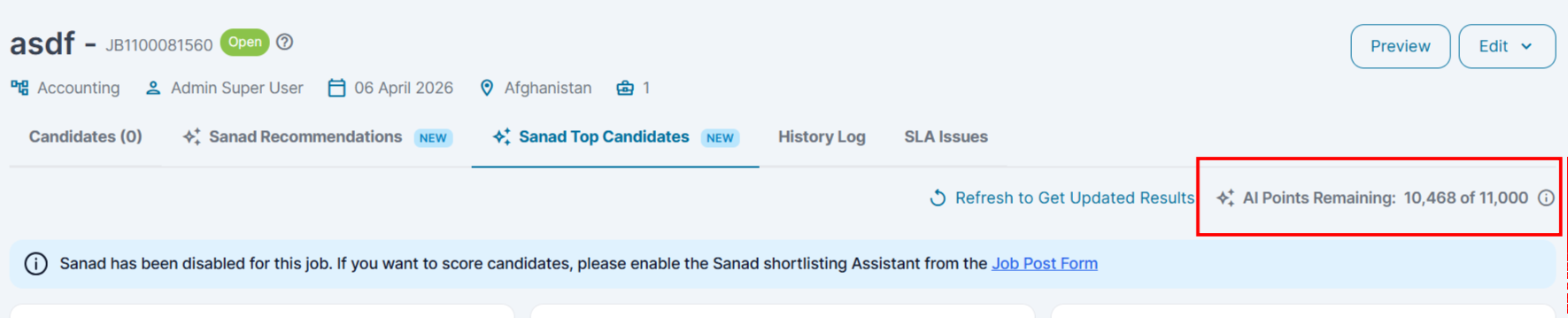
1. Go to the Sanad Recommendation tab or the Sanad top candidates tab.
2. Navigate to AI Points Remaining in the top-right corner.
3. Your current credit balance is displayed.
|  |
| --- |
| **💡 Tip:** Check your credit balance before a high-volume sourcing session. |
| --- |
### **When Credits Run Out**
When your balance reaches zero, SANAD AI actions that consume credits will be unavailable.
| **⚠️ Warning:** Actions already taken (invites sent, candidates added) are not reversed if credits run out. Only future actions are blocked. |
| --- |
**Frequently Asked Questions**
**Do AI credits expire?**
Credit expiry depends on your account terms. Check with your admin for your specific credit cycle details.
**Can I set per-user credit limits?**
Per-user credit limits are not available in Phase 1. All users draw from the same account credit pool.
- [Employers](https://lp.talentera.com/en/help/employers?hsLang=en#main-content)
- [Dashboard](https://lp.talentera.com/en/help/employers?hsLang=en#dashboard)
- [My Workspace](https://lp.talentera.com/en/help/employers?hsLang=en#my-workspace)
- [Candidates](https://lp.talentera.com/en/help/employers?hsLang=en#candidates)
- [Jobs](https://lp.talentera.com/en/help/employers?hsLang=en#jobs)
- [Evaluation Forms](https://lp.talentera.com/en/help/employers?hsLang=en#evaluation-forms)
- [Reports](https://lp.talentera.com/en/help/employers?hsLang=en#reports)
- [Requisitions](https://lp.talentera.com/en/help/employers?hsLang=en#requisitions)
- [Hiring Approval](https://lp.talentera.com/en/help/employers?hsLang=en#hiring-approval)
- [Admin Panel](https://lp.talentera.com/en/help/employers?hsLang=en#admin-panel)
- [Document Requests](https://lp.talentera.com/en/help/employers?hsLang=en#document-requests)
- [Letters](https://lp.talentera.com/en/help/employers?hsLang=en#letters)
- [Question Library](https://lp.talentera.com/en/help/employers?hsLang=en#question-library)
- [Questionnaires](https://lp.talentera.com/en/help/employers?hsLang=en#questionnaires)
- [Offer Letters](https://lp.talentera.com/en/help/employers?hsLang=en#offer-letters)
- [Sanad AI Assistant](https://lp.talentera.com/en/help/employers?hsLang=en#sanad-ai-assistant)
- [Bayt Remote CV Search](https://lp.talentera.com/en/help/employers?hsLang=en#bayt-remote-cv-search)
- [Job Seekers](https://lp.talentera.com/en/help/job-seekers?hsLang=en#main-content)
- [Creating an Account](https://lp.talentera.com/en/help/job-seekers?hsLang=en#creating-an-account)
- [Login](https://lp.talentera.com/en/help/job-seekers?hsLang=en#login)
- [Adding a Cover Letter](https://lp.talentera.com/en/help/job-seekers?hsLang=en#adding-a-cover-letter)
- [Building the CV](https://lp.talentera.com/en/help/job-seekers?hsLang=en#building-the-cv)
- [Searching for Jobs](https://lp.talentera.com/en/help/job-seekers?hsLang=en#searching-for-jobs)
- [Dashboard](https://lp.talentera.com/en/help/job-seekers?hsLang=en#dashboard)
[%20(7).png?width=55&height=55&name=Linkedin%20Ads%20-%20(1200%20%C3%97%201200%20px)%20(7).png "Linkedin Ads - (1200 × 1200 px) (7)")](http://www.talentera.com)
Copyright © 2026, Bayt Group
[mailto:CSM@bayt.net](mailto:CSM@bayt.net)