---
title: What is SANAD AI?
description: Sanad AI
---
[Skip to content](https://lp.talentera.com/en/help/what-is-sanad-ai#main-content)
English
Show submenu for translations

Open main navigation
Close main navigation
- English
Show submenu for translations
How can we help you?
- There are no suggestions because the search field is empty.
1. [Talentera Help Center](https://lp.talentera.com/en/help?hsLang=en)
2. [Employers](https://lp.talentera.com/en/help/employers?hsLang=en)
3. [Sanad AI Assistant](https://lp.talentera.com/en/help/employers?hsLang=en#sanad-ai-assistant)
# What is SANAD AI?
### **Overview**
SANAD AI is Talentera’s built-in AI layer that helps recruiters and hiring managers work faster across sourcing, shortlisting, and job preparation. Every SANAD AI capability runs inside the same Talentera session you already use, no external tools, no separate logins, no data exports.
This article gives you a quick overview of all SANAD AI capabilities available today, what each one does, and where to find them. Use it as a starting point, then follow the links to the in-depth article for any capability you want to use.
### **SANAD AI Capabilities**
SANAD AI currently includes six capabilities. Its own in-depth article covers each.
### **SANAD AI Summary**
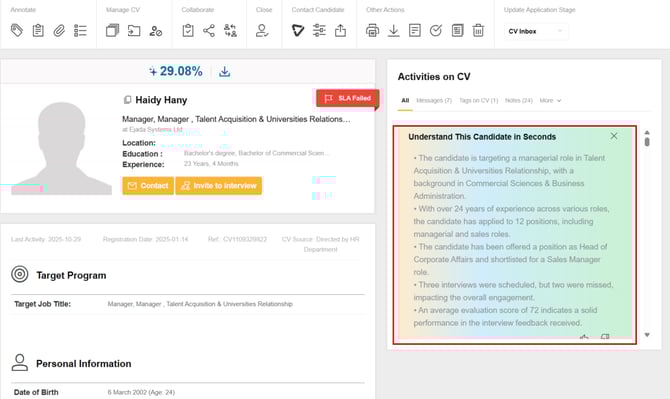
Generates an instant, bullet-point snapshot of any candidate’s recorded activity in your account, application history, missed steps, evaluation scores, and pipeline outcomes. One click in the Activities tab inside CV Search.
- Use it when: You are reviewing candidates in CV Search and need to decide quickly who is worth a deeper look.
- Entry point: CV Search → Candidate Profile → Activities tab → Summarize with Sanad.
- → What is SANAD AI Summary?
- → How to Use SANAD AI Summary in CV Search
### **SANAD Sourcing**
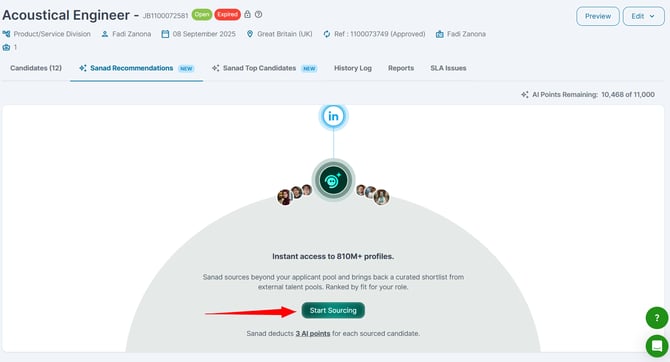
Delivers AI-matched external candidates directly inside a live job’s workflow. Enable it on any active job and receive a curated list of candidates in the Sanad Recommendations tab. You can invite candidates to apply, add them to the job inbox, or reveal their contact email.
- Use it when your organic applicant pool is not large or qualified enough for a live role.
- Entry point: Jobs → Open a live job → Sanad Recommendations tab → Start sourcing.
- → What is SANAD Sourcing?
- → How to Enable SANAD Sourcing on a Job
### **SANAD Shortlisting**
Automatically ranks and scores candidates who have already applied to a live job. The AI analyzes each applicant’s CV against the job description and returns a ranked list so you can prioritize your review.
- Use it when: You have applicants and need help deciding who to review first.
- Entry point: Jobs → Open a live job → Sanad top candidates tab → Start Shortlisting.
- → What is SANAD Shortlisting?
### **JD Generator**
Creates a complete, structured job description from a short input, job title, and a few key requirements. Use it when posting a new job or when an existing JD is incomplete. A detailed JD improves the accuracy of both SANAD Sourcing and SANAD Shortlisting.
- Use it when: You are posting a new job or need to improve an existing JD before enabling AI matching.
- Entry point: Jobs → Post a New Job or edit a draft → Generate with SANAD in the JD field.
- → How to Use the JD Generator
### **Skill Generator**
Automatically suggests a relevant skills list for a job based on the title and description. A complete skills list improves matching quality across SANAD AI features.
- Use it to quickly populate or improve the skills section of a job posting.
- Entry point: Job posting form → Skills section → Generate Skills.
- → How to Use the Skill Generator
### **AI Credits**
AI Credits are the usage currency for SANAD AI features. Actions like generating a summary, revealing an email, inviting a sourced candidate, or adding a candidate to a job inbox consume credits from your account’s balance. You can check your balance in the Admin Panel.
- Viewing candidate cards, reading existing summaries, and browsing recommendations do NOT consume credits.
- → What Are SANAD AI Credits and How Are They Consumed?
### **How the Capabilities Work Together**
SANAD AI capabilities are designed to complement each other across the hiring workflow:
1. Use the JD Generator and Skill Generator to build a complete, detailed job posting.
2. Enable SANAD Sourcing on the live job to supplement your applicant pool with AI-matched external candidates.
3. Use SANAD Shortlisting to rank and prioritize applicants.
4. Use the SANAD AI Summary to quickly review any candidate’s activity history before making a shortlisting decision.
| *\[ SCREENSHOT, SANAD AI workflow, how capabilities connect across the hiring process \]* |
| --- |
| **💡 Tip:** Start with a strong JD. Every SANAD AI capability that uses matching, Sourcing, Shortlisting, and shortlisting performs better when the job description is detailed and specific. |
| --- |
### **What SANAD AI Does NOT Do**
- SANAD AI does not make hiring decisions. Every capability is designed to help you prioritize and review; the final decision is always yours.
- SANAD AI does not access data outside your Talentera account. Summaries, rankings, and recommendations are based on data recorded in your system and the job description you provide.
- SANAD AI is not an outreach automation tool in Phase 1. Actions are limited to Invite to Apply and Add to Job Inbox.
### **Language Support**
All SANAD AI capabilities support Arabic and English. Features generate output in the language of your current Talentera interface. Arabic job titles, skill names, and stage names are preserved as they appear in your account.
**Frequently Asked Questions**
**Do I need to enable each SANAD AI capability separately?**
SANAD AI Summary and the generators (JD, Skill) are available automatically when SANAD AI features are enabled on your account. SANAD Sourcing must be enabled for each job in the Sanad Recommendations tab. SANAD Shortlisting must be enabled for each job in the Candidates or Pipeline tab.
**Where can I check which SANAD AI capabilities are enabled on my account?**
Go to the Admin Panel and navigate to the SANAD AI settings section. Your admin can confirm which capabilities are active.
**Is SANAD AI available on the Talentera Mobile App?**
In Phase 1, SANAD AI capabilities are available on the web version of Talentera. The mobile app supports CV Search, pipeline management, and approvals, but SANAD AI features are not yet available on mobile.
- [Employers](https://lp.talentera.com/en/help/employers?hsLang=en#main-content)
- [Dashboard](https://lp.talentera.com/en/help/employers?hsLang=en#dashboard)
- [My Workspace](https://lp.talentera.com/en/help/employers?hsLang=en#my-workspace)
- [Candidates](https://lp.talentera.com/en/help/employers?hsLang=en#candidates)
- [Jobs](https://lp.talentera.com/en/help/employers?hsLang=en#jobs)
- [Evaluation Forms](https://lp.talentera.com/en/help/employers?hsLang=en#evaluation-forms)
- [Reports](https://lp.talentera.com/en/help/employers?hsLang=en#reports)
- [Requisitions](https://lp.talentera.com/en/help/employers?hsLang=en#requisitions)
- [Hiring Approval](https://lp.talentera.com/en/help/employers?hsLang=en#hiring-approval)
- [Admin Panel](https://lp.talentera.com/en/help/employers?hsLang=en#admin-panel)
- [Document Requests](https://lp.talentera.com/en/help/employers?hsLang=en#document-requests)
- [Letters](https://lp.talentera.com/en/help/employers?hsLang=en#letters)
- [Question Library](https://lp.talentera.com/en/help/employers?hsLang=en#question-library)
- [Questionnaires](https://lp.talentera.com/en/help/employers?hsLang=en#questionnaires)
- [Offer Letters](https://lp.talentera.com/en/help/employers?hsLang=en#offer-letters)
- [Sanad AI Assistant](https://lp.talentera.com/en/help/employers?hsLang=en#sanad-ai-assistant)
- [Bayt Remote CV Search](https://lp.talentera.com/en/help/employers?hsLang=en#bayt-remote-cv-search)
- [Job Seekers](https://lp.talentera.com/en/help/job-seekers?hsLang=en#main-content)
- [Creating an Account](https://lp.talentera.com/en/help/job-seekers?hsLang=en#creating-an-account)
- [Login](https://lp.talentera.com/en/help/job-seekers?hsLang=en#login)
- [Adding a Cover Letter](https://lp.talentera.com/en/help/job-seekers?hsLang=en#adding-a-cover-letter)
- [Building the CV](https://lp.talentera.com/en/help/job-seekers?hsLang=en#building-the-cv)
- [Searching for Jobs](https://lp.talentera.com/en/help/job-seekers?hsLang=en#searching-for-jobs)
- [Dashboard](https://lp.talentera.com/en/help/job-seekers?hsLang=en#dashboard)
[%20(7).png?width=55&height=55&name=Linkedin%20Ads%20-%20(1200%20%C3%97%201200%20px)%20(7).png "Linkedin Ads - (1200 × 1200 px) (7)")](http://www.talentera.com)
Copyright © 2026, Bayt Group
[mailto:CSM@bayt.net](mailto:CSM@bayt.net)