---
title: What is SANAD Shortlisting?
description: What is SANAD Shortlisting?
---
[Skip to content](https://lp.talentera.com/en/help/what-is-sanad-shortlisting#main-content)
English
Show submenu for translations

Open main navigation
Close main navigation
- English
Show submenu for translations
How can we help you?
- There are no suggestions because the search field is empty.
1. [Talentera Help Center](https://lp.talentera.com/en/help?hsLang=en)
2. [Employers](https://lp.talentera.com/en/help/employers?hsLang=en)
3. [Sanad AI Assistant](https://lp.talentera.com/en/help/employers?hsLang=en#sanad-ai-assistant)
# What is SANAD Shortlisting?
| **📌 Note:** SANAD Shortlisting is a separate feature from the standard non-AI shortlisting workflow. If your account has the standard shortlisting flow, it continues to work as before. SANAD Shortlisting adds an AI-powered ranking on top of the existing process. |
| --- |
### **Overview**
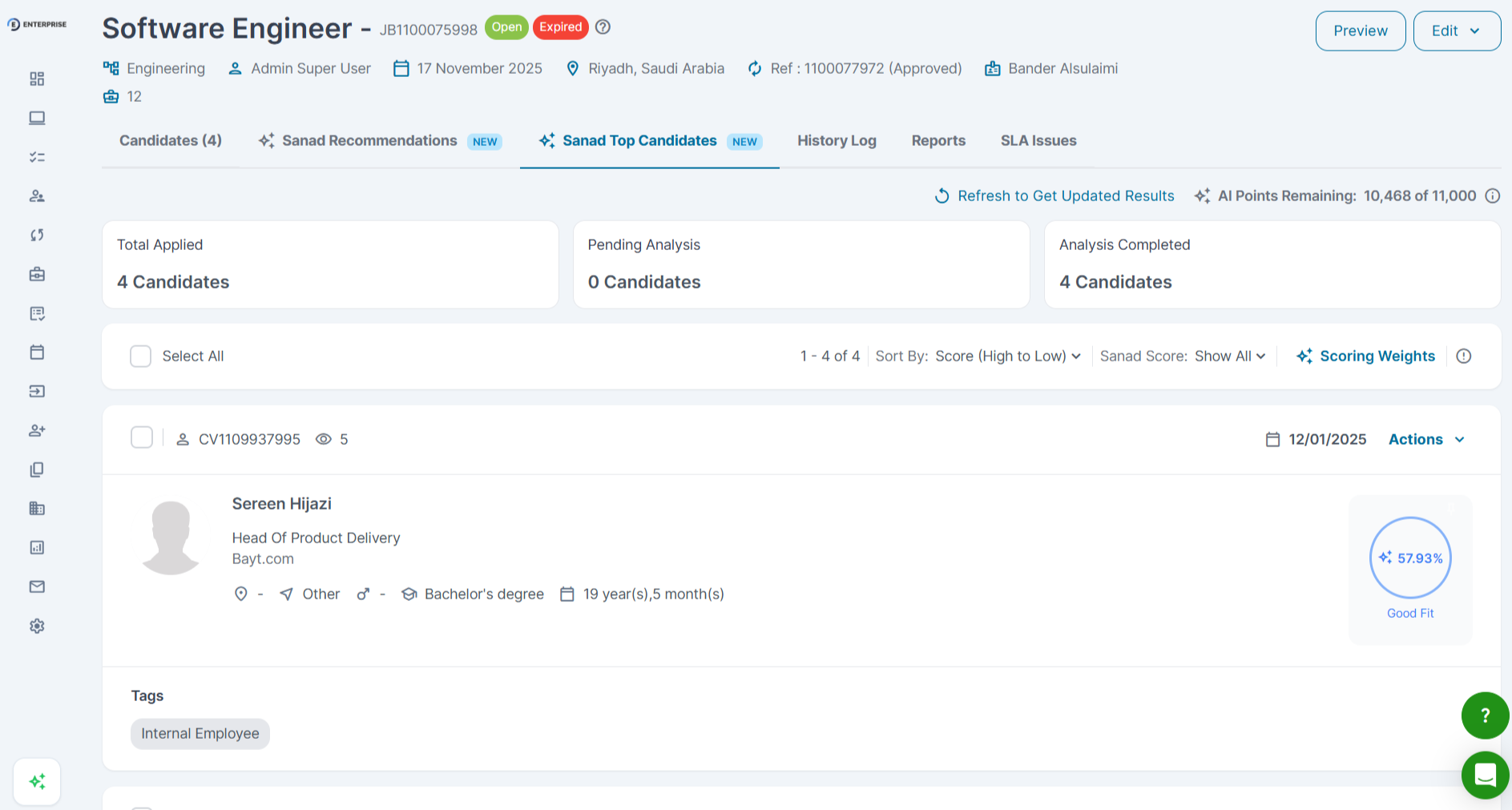
SANAD Shortlisting is an AI-powered feature that automatically ranks and scores candidates who have applied to a live job in Talentera. It analyzes each applicant’s CV and profile against the job description and returns a ranked list.
SANAD Shortlisting is for applicants who have already applied. It is different from SANAD Sourcing, which surfaces new external candidates.
|  |
| --- |
### **How SANAD Shortlisting Works**
When SANAD Shortlisting is enabled on a job, the AI analyzes each applicant’s submitted CV against the job description. Applicants are scored and ranked by match strength.
### **How to Use SANAD Shortlisting**
1. Open the job in the Jobs section.
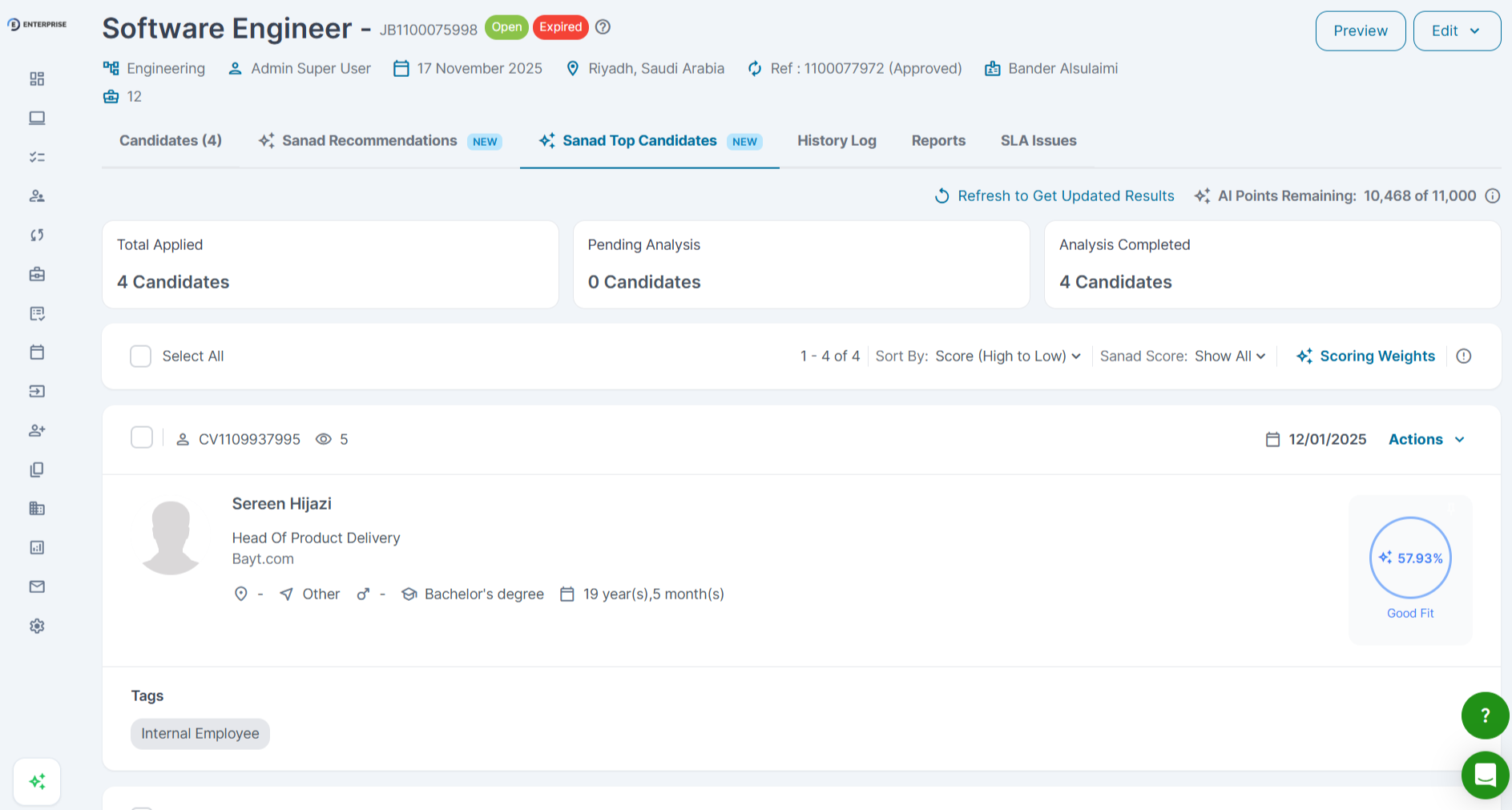
2. Navigate to the Sanad top recommendation tab.
3. Review the ranked list, highest-scoring applicants appear at the top.
4. Click any applicant to view their profile alongside the shortlisting rationale.
### **SANAD Shortlisting vs SANAD Sourcing**
- Shortlisting: Rank applicants who already applied.
- Sourcing: Surface external candidates from a global CV database.
- Use Shortlisting when you have applicants and need to prioritize them.
- Use Sourcing when your applicant pool is too small.
**Frequently Asked Questions**
**Does SANAD Shortlisting make the hiring decision for me?**
No. SANAD Shortlisting ranks applicants to help you prioritize. The hiring decision is always yours.
**Can I override the SANAD ranking?**
Yes. The SANAD ranking is a suggested order. You can reorder candidates and move them through the pipeline independently.
**Does SANAD Shortlisting use the full JD?**
Yes. Detailed, structured JDs produce more accurate rankings. Use the JD Generator before enabling shortlisting.
- [Employers](https://lp.talentera.com/en/help/employers?hsLang=en#main-content)
- [Dashboard](https://lp.talentera.com/en/help/employers?hsLang=en#dashboard)
- [My Workspace](https://lp.talentera.com/en/help/employers?hsLang=en#my-workspace)
- [Candidates](https://lp.talentera.com/en/help/employers?hsLang=en#candidates)
- [Jobs](https://lp.talentera.com/en/help/employers?hsLang=en#jobs)
- [Evaluation Forms](https://lp.talentera.com/en/help/employers?hsLang=en#evaluation-forms)
- [Reports](https://lp.talentera.com/en/help/employers?hsLang=en#reports)
- [Requisitions](https://lp.talentera.com/en/help/employers?hsLang=en#requisitions)
- [Hiring Approval](https://lp.talentera.com/en/help/employers?hsLang=en#hiring-approval)
- [Admin Panel](https://lp.talentera.com/en/help/employers?hsLang=en#admin-panel)
- [Document Requests](https://lp.talentera.com/en/help/employers?hsLang=en#document-requests)
- [Letters](https://lp.talentera.com/en/help/employers?hsLang=en#letters)
- [Question Library](https://lp.talentera.com/en/help/employers?hsLang=en#question-library)
- [Questionnaires](https://lp.talentera.com/en/help/employers?hsLang=en#questionnaires)
- [Offer Letters](https://lp.talentera.com/en/help/employers?hsLang=en#offer-letters)
- [Sanad AI Assistant](https://lp.talentera.com/en/help/employers?hsLang=en#sanad-ai-assistant)
- [Bayt Remote CV Search](https://lp.talentera.com/en/help/employers?hsLang=en#bayt-remote-cv-search)
- [Job Seekers](https://lp.talentera.com/en/help/job-seekers?hsLang=en#main-content)
- [Creating an Account](https://lp.talentera.com/en/help/job-seekers?hsLang=en#creating-an-account)
- [Login](https://lp.talentera.com/en/help/job-seekers?hsLang=en#login)
- [Adding a Cover Letter](https://lp.talentera.com/en/help/job-seekers?hsLang=en#adding-a-cover-letter)
- [Building the CV](https://lp.talentera.com/en/help/job-seekers?hsLang=en#building-the-cv)
- [Searching for Jobs](https://lp.talentera.com/en/help/job-seekers?hsLang=en#searching-for-jobs)
- [Dashboard](https://lp.talentera.com/en/help/job-seekers?hsLang=en#dashboard)
[%20(7).png?width=55&height=55&name=Linkedin%20Ads%20-%20(1200%20%C3%97%201200%20px)%20(7).png "Linkedin Ads - (1200 × 1200 px) (7)")](http://www.talentera.com)
Copyright © 2026, Bayt Group
[mailto:CSM@bayt.net](mailto:CSM@bayt.net)